
How to use the fomo app: a tab-by-tab guide
The fomo app has five tabs along the bottom: Home to browse tokens, Search to look one up, a social feed in the middle, Friends with the leaderboard, and Profile, where your money and settings live. You fund one cash balance, find a token, check it, and buy. Here is what each tab does, where the buttons you need are hidden, and a sensible order to explore them in your first week.
How does the fomo app work?
fomo is a trading app for iOS, Android and the web. When you sign up, it creates two wallets for you, one for Solana and one for EVM networks, and puts everything behind a single cash balance held as USDC. From that balance you can buy tokens on seven chains: Solana, Base, BNB Chain, Ethereum, Monad, Robinhood Chain and Arc.
The part that surprises people coming from a standalone wallet is how little chain management there is. fomo’s help center says there is "no bridging, no network switching, and no separate balances to manage", and that the app handles routing behind the scenes. You pick a token; fomo works out the route.
What the app does not hide is cost. Each chain has its own fee rule, and that shapes how you use the fomo trading app more than any menu does. Solana is the only chain where fomo pays the network fee for you; everywhere else you pay the network fee on top of the 0.50% trading fee. Our fomo fees page has every tier.
What does each tab in the fomo app do?
This is the layout fomo’s help center describes, checked on 19 October 2026:
| Tab | What it is for | What you will use it for first |
|---|---|---|
| Home | Portfolio value, a Deposit button, Weekly Top Trades, and the Watchlist, Tokens and Perps lists | Browsing tokens by list, such as Trending or Most held |
| Search | Look up any token by name or contract address, and find user profiles | Checking a token someone mentioned before you buy it |
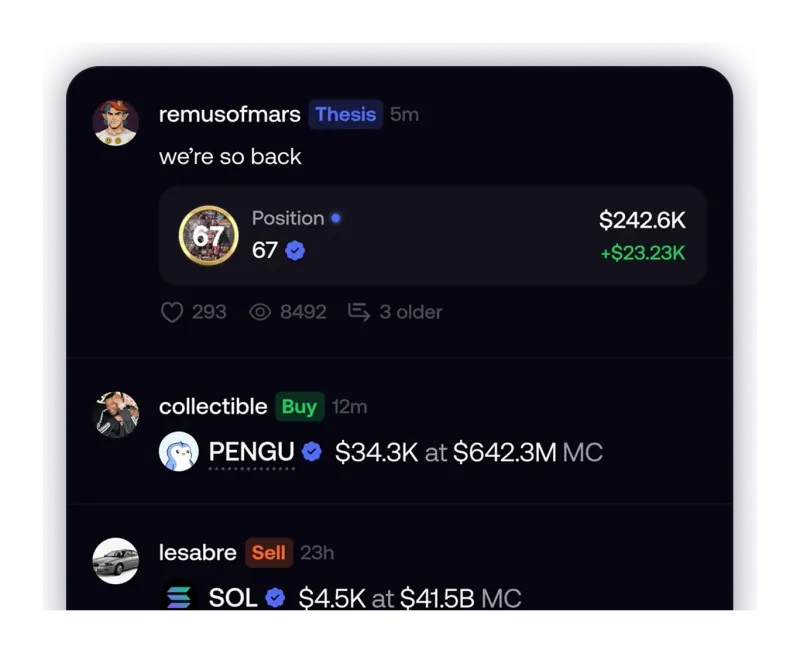
| Feed (middle tab) | Trades and posts from other users | Seeing what traders are buying, and why |
| Friends | Activity from people you follow, plus the Leaderboard tab at the top | Finding and comparing traders |
| Profile (far right) | Cash balance, open and closed positions, followers, and settings | Depositing, withdrawing and changing settings |
The Tokens list on Home can be filtered by Crypto, Trending, Most held, Graduated, Bonding, Gainers and Community. Each of those means something specific, and two of them, Bonding and Graduated, carry much more risk than the rest. We explain every list in our guide to finding tokens on fomo.
Where do you add or take out money?
Everything to do with money sits on the Profile tab, next to your cash balance:
- The plus icon opens deposits. fomo accepts Apple Pay, bank-issued debit cards and USDC sent from another wallet or exchange.
- The three-dot icon opens Withdraw and Send. Withdraw moves money out to a bank account (US accounts only) or to a crypto wallet; Send transfers to another fomo user by username.
- Open and closed positions are listed under the balance, with the PnL on each (our fomo PnL guide explains how it is calculated).
The Home screen also has a Deposit button under your portfolio value, so you do not have to go to Profile just to add funds. Which networks accept a crypto deposit, how long withdrawals take, and how to move your key to another wallet are all in our fomo wallet guide.
What is in the fomo settings menu?
Tap the gear icon in the top-right corner of your profile. fomo’s help center lists these sections:
- Account: your Solana and EVM wallet addresses, your X connection and your display name. This is also where private key export lives, covered step by step in how to export a fomo wallet.
- Notifications: which alerts you get, from trades by people you follow to announcements. Our fomo notifications guide covers each type.
- Security: where you turn on Face ID or Touch ID on iPhone, or fingerprint on Android. Biometrics are optional, but once on they are required to withdraw and to export a key.
- Appearance, Deposit and Withdraw preferences, Legal and Privacy (where account deletion is), Taxes, Help and Support (the in-app contact route) and Discord.
If you are wondering what the Taxes section can produce for you, our page on fomo crypto taxes covers what fomo documents about trade records, and what it does not.
How do you use the feed, Friends and the leaderboard?
The social side is what sets fomo apart from a plain wallet, and it is also where new users overtrade. Here is what each piece does:
- The feed shows buys and sells from accounts you follow and from top traders, along with thesis posts, where a trader writes up why they bought a token. You can switch between everyone and only people you follow.
- Friends lists the accounts you follow and their activity.
- The Leaderboard, at the top of the Friends tab, ranks every fomo trader by realized and unrealized PnL over 24 hours, 7 days, 30 days or all time. fomo stresses it is not curated: anyone can appear on it. Your own rank and PnL show at the top.
Tapping a trader opens their positions, thesis posts and history. Following them adds their trades to your feed and notifications. fomo has no automatic copy trading: you see the trade and decide yourself. Before you follow anyone, read our guide to the fomo leaderboard and our breakdown of what the feed does not show.
What should you do first in the fomo app?
A sensible order for your first week, built only from how the app is laid out and what fomo charges:
- Turn on biometrics in Settings, then Security, before you add money.
- Make a small deposit. fomo has no minimum deposit. Its own beginner answers suggest starting with $20 to $50 and only risking money you can afford to lose.
- Browse before you buy. Use the Tokens lists and the verified checkmark (see what fomo verification means), and open a token’s page to check its holders and its About section.
- Mind order size on Solana. On the lowest-fee Solana route, orders under 5 USDC pay a flat 0.10 USDC and orders from 5 to 47.50 USDC pay 2%. Larger orders cost less in percentage terms.
- Place one small trade, following our walkthrough of your first trade on fomo, then try a small withdrawal so you know the route works.
- Watch the feed for a few days before following anyone. fomo’s own beginner advice is to observe before acting.
One tab to leave alone if you are in the US: Perps. fomo says its perpetual futures are not available to US persons, so the third list on Home is not for you. Details are on our fomo perps page.
If you have not installed the app yet, our fomo app download guide has the official store links, and our sign-up guide explains why to open a referral link before creating the account: the 10% fee discount can only be attached at sign-up, never afterwards.
Using the fomo app: questions
Where are the settings in the fomo app?
Open the Profile tab, the one on the far right of the bottom bar, and tap the gear icon in the top-right corner. fomo’s help center lists Account, Appearance, Notifications, Security, Deposit and Withdraw preferences, Legal and Privacy, Taxes, Help and Support, and Discord in that menu.
Can you search for a token by its contract address on fomo?
Yes. fomo’s help center says the Search tab looks up any token by name or by contract address. Searching by address is the safer habit when several tokens share a name, as long as you copy the address from the project’s official channels.
Do you have to switch networks to trade on different chains in fomo?
No. fomo says all seven chains run from one account and one cash balance, with no bridging, no network switching and no separate balances to manage. The app routes each trade for you. The chain still matters for fees and for which network you deposit on.
Is the fomo leaderboard a list of traders fomo recommends?
No. fomo describes it as a ranking of every trader by realized and unrealized PnL, not a curated list. Anyone can appear on it based on their own results, and a short-window rank can reflect one lucky trade.
Where are the deposit and withdraw buttons in the fomo app?
Both sit next to your cash balance on the Profile tab. The plus icon opens deposits, and the three-dot icon opens Withdraw and Send. The Home screen also shows a Deposit button under your portfolio value.
Verified 9 October 2026. Figures on this page were checked against these sources on that date. fomo can change fees and features at any time; if something here no longer matches, tell us through the contact page and we will update it.
- fomo help center: Navigating the app
- fomo help center: Supported chains
- fomo help center: Leaderboard
- fomo help center: Browsing tokens on fomo
- fomo help center: What is fomo (updated 12 August 2026)
- fomo help center: Trading fees on fomo
- fomo help center: How fomo keeps your crypto secure
- fomo help center: What perpetual futures are on fomo (10 June 2026)
- fomo answers: How do I start trading crypto with no experience? (19 February 2026)