
How to sign up for fomo, step by step
To sign up for fomo with the fee discount, open a referral link first, then create your account with email or Apple ID, fund it and place a trade. The only step you cannot fix later is the first one: fomo attaches referrals on the signup screen and has no field to add one afterwards.
Start step 1: open the referral link
Before you start: can you use fomo?
- Location. fomo's Terms of Service block access from places including Crimea, Cuba, Donetsk, the Democratic Republic of the Congo, Iran, Libya, Luhansk, Myanmar, North Korea, Sudan, Venezuela, Yemen and sanctioned jurisdictions, and forbid VPNs to get around that.
- Age. The App Store lists the app as 18+.
- Device. iPhone needs iOS 16.4 or later; Android installs from Google Play; any modern browser works at fomo.family.
- Money you can lose. Only deposit what you could lose entirely.
Step 1: open the referral link before anything else
Open our fomo referral link on the phone or computer you will sign up with. It takes you to fomo.family. If you are on a phone and the app is not installed yet, install it from the official fomo app listings and come back to the link, so the signup screen is reached through it. If you already installed and registered, the discount can no longer be added in the app.
Step 2: create your account with email or Apple ID
fomo's own app guide describes sign-up as a choice between an email address and Apple ID, and whichever you pick becomes your fomo login for good. You do not choose a seed phrase or connect an existing wallet: fomo generates a fomo wallet for you through Privy, and there is no ID upload in the flow (see fomo KYC rules). Miss the referral at this step and only fomo support can attach it later, its third-party wallet provider. On iPhone, you can then turn on Face ID under Settings, then Security, to protect withdrawals, private key export and opening the app. Read how the fomo wallet is secured if you want to know what that means for your funds.
Step 3: add funds to your cash balance
| Method | What fomo says | Watch out for |
|---|---|---|
| Apple Pay | Instant funding; some tokens can be bought directly | Fees not published; check the confirmation screen |
| Debit card | Enter the amount in dollars | Fees not published |
| USDC transfer | USDC only, on Solana, Base or BNB Chain | Other tokens or networks can be lost for good |
If you are sending USDC from an exchange, copy the deposit address for the exact network you are withdrawing on, and send a small test amount first.
Step 4: place your first trade
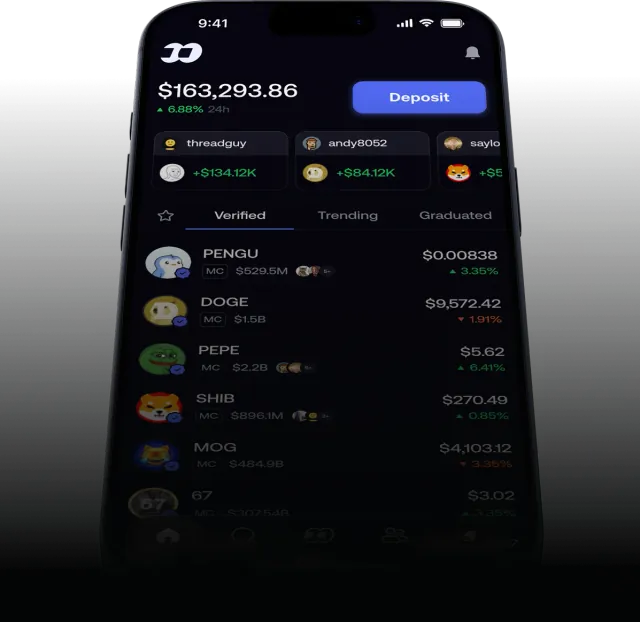
Tap a token from the home screen, search or your feed (what each tab does is in our guide to using the fomo app), check which chain it is on, then tap buy and enter an amount. Start small. On Solana, orders between 5 and 47.50 USDC pay a 2% fee, while from 190 USDC they pay 0.50% with no gas; on other chains it is 0.50% plus the network fee. The fomo fee breakdown shows what your order size will cost, and our guide to buying crypto on fomo walks through the buy screen itself.
Step 5: confirm the discount is active
Open the details of a trade on a chain charged at the standard rate. A fee of 0.45% means the referral is on the account; 0.50% means it is not. fomo does not show referrals anywhere else we could find. If it is missing, contact fomo support through help.fomo.family, because only fomo can fix it. More on how the discount works is on the fomo referral code page.
Step 6: know how to get money out
Withdrawals start from the cash balance on your profile. You can withdraw USDC on-chain, to a debit card or to a bank account, where available in your region. fomo says bank withdrawals arrive within three business days, the first may need additional verification, and larger ones may be reviewed. Withdrawing to the wrong network can lose the funds, so double-check the network. For everything else, see the fomo FAQ.
Sign-up questions
How long does it take to sign up for fomo?
Creating the account itself takes a minute or two with an email address or Apple ID. Funding is instant with Apple Pay or a debit card; a USDC deposit depends on the network you send from.
Do I need a crypto wallet to sign up for fomo?
No. fomo creates a wallet for you when you sign up. It is generated and managed by Privy, a third-party provider, and you can export the private key later if you want.
Does fomo require ID verification?
fomo’s guides do not describe an ID check to sign up or deposit. Bank withdrawals are different: the first withdrawal may need extra verification and larger withdrawals can be reviewed.
I signed up without a referral. What now?
fomo does not let you add a referral in the app after sign-up. Its help center suggests contacting support. Creating a second account to get the discount may conflict with fomo’s terms, so ask support first.
Can I sign up for fomo from any country?
No. fomo’s Terms of Service bar access from a list of restricted and sanctioned places and prohibit using a VPN to get around it. Perps are also unavailable to US persons.
Verified 9 October 2026. Figures on this page were checked against these sources on that date. fomo can change fees and features at any time; if something here no longer matches, tell us through the contact page and we will update it.
- fomo help center: How referral codes and fee discounts work
- fomo blog: Navigating your fomo app
- fomo blog: A guide to deposits and withdrawals
- fomo answers: How long does it take to withdraw from fomo?
- fomo Terms of Service (dated 17 August 2026)
- fomo blog: How fomo keeps your crypto secure
- fomo help center: Trading fees on fomo
- Apple App Store: fomo - never miss out