
Fomo app notifications: what you get and how to control it
fomo sends alerts about traders you follow, trending tokens, top traders, new followers and fomo announcements, and you can switch each type on or off under Profile → Settings → Notifications. The catch most new users miss: price alerts exist only for perpetual futures positions, and perps are not open to US persons. There is no way to set a price alert on a spot token or memecoin.
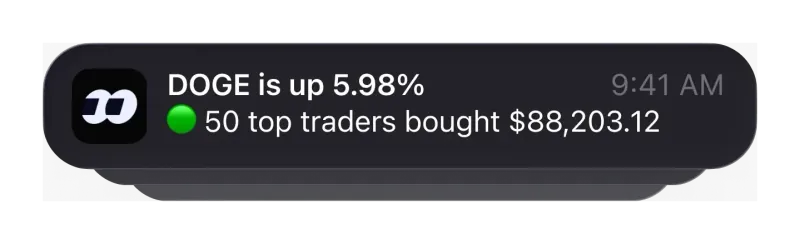
What notifications does the fomo app send?
fomo's help center article on notifications, last updated on 12 August 2026, lists these types. Each one can be turned off on its own:
| Notification type | What it tells you | Worth keeping on as a beginner? |
|---|---|---|
| Activity from tokens and accounts you follow | Updates on the tokens and people you chose to follow | Yes, it is the reason to follow anything |
| Friends activity | When accounts you follow make trades | Yes, with a threshold (see below) |
| Trending tokens | Tokens gaining attention in the app | Optional; easy to overreact to |
| Top traders activity | Moves by the app's top traders | Optional; noisy if you follow many people already |
| Announcements from fomo | Product news from fomo itself | Yes, low volume |
| New followers | Someone started following you | Your choice |
| Price alerts on your perps positions | Price approaching or reaching Take Profit, Stop Loss and Liquidation levels | Only relevant if you can trade perps |
The help center does not say which of these are switched on by default, so check the settings screen once after you sign up rather than assuming.
Where are the fomo notification settings?
fomo documents a four-tap path:
- Open your Profile.
- Tap the gear icon in the top right corner.
- Select Settings.
- Select Notifications.
On that screen you can switch individual types on or off, or turn everything off at once with the “Enabled notifications” toggle at the top. If push alerts still do not arrive after you enable them in fomo, check that notifications for the app are also allowed in your phone's own settings, since the app cannot override that.
Can you get alerts when a trader you follow buys or sells?
Yes, and this is the notification most people install fomo for. You follow a trader with the Follow button on their profile or on one of their posts in the fomo social feed. According to fomo's help center, if you follow a trader and have notifications on, you get notifications past a threshold set by you for all their buys and sells. In practice the threshold is your noise filter: set it high and you only hear about trades that matter to that trader; set it low and a busy account can fill your lock screen.
Three details from the same help article are useful before you start following people:
- There is a follow cap. fomo limits how many traders you can follow and says the cap rises with your own activity in the app. Hitting it does not mean anything is wrong with your account.
- Followed traders get their own feed. Their buys, sells and thesis posts appear in a Friends-only feed, and your Friends list shows each one's PnL, sortable by percentage or dollars over 24 hours, 7 days or 30 days.
- An alert is not a trade. fomo's help center states plainly that fomo does not have a copy trading feature. You get told; you decide. Our guide to following traders on fomo explains what that means for timing and cost.
Choosing who to follow is the harder part. The fomo leaderboard guide covers how to read a trader's record before their alerts start reaching you.
Does fomo have price alerts?
Only for perpetual futures. fomo's help center says price alerts apply to perps positions only: when you hold a perp, fomo can notify you as the price approaches and reaches your Take Profit, Stop Loss and Liquidation levels. It is equally clear about what is missing: there are no price alerts for spot or memecoin holdings, and you cannot set an alert for an arbitrary token price or dollar amount.
For readers in the United States this matters twice over, because fomo's Terms of Service do not make perps available to US persons. A US user of the fomo app will therefore not get price alerts of any kind; spot and memecoin positions have to be watched manually. Some third-party write-ups describe customizable price alerts on any token; fomo's own documentation does not support that. What perps are and who can use them is covered on our fomo perps page.
If you rely on price alerts to manage risk, plan around their absence: size spot positions so that you do not need an alert to limit a loss, or use a separate price-tracking tool you already trust. We have not found a limit or stop order for spot trades in fomo's published guides either.
Push notifications or the activity center: what is the difference?
fomo delivers alerts in two places:
| Push notifications | Activity center (in-app) | |
|---|---|---|
| Where you see it | Your phone's lock screen and notification tray | Inside the app, opened from the home screen |
| Works with the app closed | Yes | No, you open it when you want |
| What it holds | The types you enabled in settings | Follow activity, new traders joining fomo, thesis mentions and sends from other users |
| Best for | Moves you want to hear about quickly | Catching up without being interrupted |
A reasonable split is to keep push for the few traders you actually act on and let everything else wait in the activity center.
How should a new fomo user set up notifications?
The point of an alert is to tell you something you would act on. Everything else is a prompt to trade more, and on fomo every trade has a cost: 0.50% on most chains, and small Solana orders between 5 and 47.50 USDC sit in a 2% tier, as the fomo fee schedule shows. A setup that respects that:
- Start with announcements only for the first few days while you learn the app.
- Follow two or three traders and set a threshold high enough that only their meaningful trades reach you.
- Leave trending and top trader alerts off until you notice you are missing something useful, not the other way round.
- Treat any message asking for a key or a “verification” payment as a scam, whatever it looks like. How fake fomo sites and fake support work is on our fomo scams page.
If you do not have an account yet, the order matters more than the settings: open a referral link first, because fomo only attaches the 10% fee discount at sign-up, then follow the step-by-step sign-up guide. Download links for every platform are in our fomo app download guide.
Fomo notification questions
Can I set a price alert for a memecoin on fomo?
No. fomo’s help center says price alerts apply to perps positions only, and that there are no price alerts for spot or memecoin holdings. You also cannot set an alert for an arbitrary token price or dollar amount.
How do I turn off all fomo notifications?
Open your Profile, tap the gear icon in the top right, choose Settings, then Notifications, and switch off the “Enabled notifications” toggle at the top of the screen. You can also leave it on and switch off single types instead.
Will fomo notify me about every trade a followed trader makes?
Only above a threshold you choose. fomo’s help center says that if you follow a trader and have notifications on, you get notifications past a threshold set by you for all their buys and sells, so small trades can stay quiet.
Where do I find notifications I missed?
In the activity center, which fomo says you can open from the home screen. It shows follow activity, new traders joining fomo, thesis mentions and sends from other users.
Do fomo notifications place trades for me?
No. A notification only tells you something happened. fomo’s help center states that fomo does not have a copy trading feature, so every buy or sell is one you place yourself.
Verified 9 October 2026. Figures on this page were checked against these sources on that date. fomo can change fees and features at any time; if something here no longer matches, tell us through the contact page and we will update it.
- fomo help center: Notifications (updated 12 August 2026)
- fomo help center: Following other traders
- fomo help center: The social feed (23 April 2026)
- fomo help center: Does fomo have copy trading (19 May 2026)
- fomo Terms of Service (dated 17 August 2026)
- fomo help center: Trading fees on fomo
- fomo help center: How referral codes and fee discounts work